Tiling Compositors Can't Tell Browser Windows Apart

Hey, it’s me again. You might remember me from bangers such as Ricing Arch Linux with Claude Code or The Agent Runtime. Today, I’m back with a surprise: a Rust crate that helps tiling compositors tell one browser window from another. I initially wanted to publish it on the AUR, but registration is currently closed following a malware incident. The signup page just returns a 503. I still managed to get a crate out though, so let me talk you through why you’d want to use it and how it works.
After years of using Linux for both personal and professional work, I decided a couple of months ago to finally move over to Arch Linux and tiling window managers. Here’s what I had to say back then:
The first thing you’ll need to pick is a display server. In the year of our Lord 2026, the two options are Xorg and Wayland. While most would recommend Wayland (justifiably, since Xorg is being deprecated by Red Hat), I chose Xorg for stability and compatibility with older software.
As you can see, I initially chose Xorg for my rice. It was good enough for most use cases, but I kept hitting scrolling issues, even with picom running, and eventually installed sway as a second session to see if Wayland did better.
I ended up loving the experience and ported my configs over, which was mostly one-to-one: rofi is Wayland native, waybar is close enough to polybar, and most of what I’d been worried about (screen sharing, for example) turned out to be solved already.
The one thing that kept bugging me was Chromium and Firefox: they don’t label their windows distinctly, so popups get tiled instead of floated. I’m aware this is a deeply first-world problem to have, but it nagged at me for weeks.
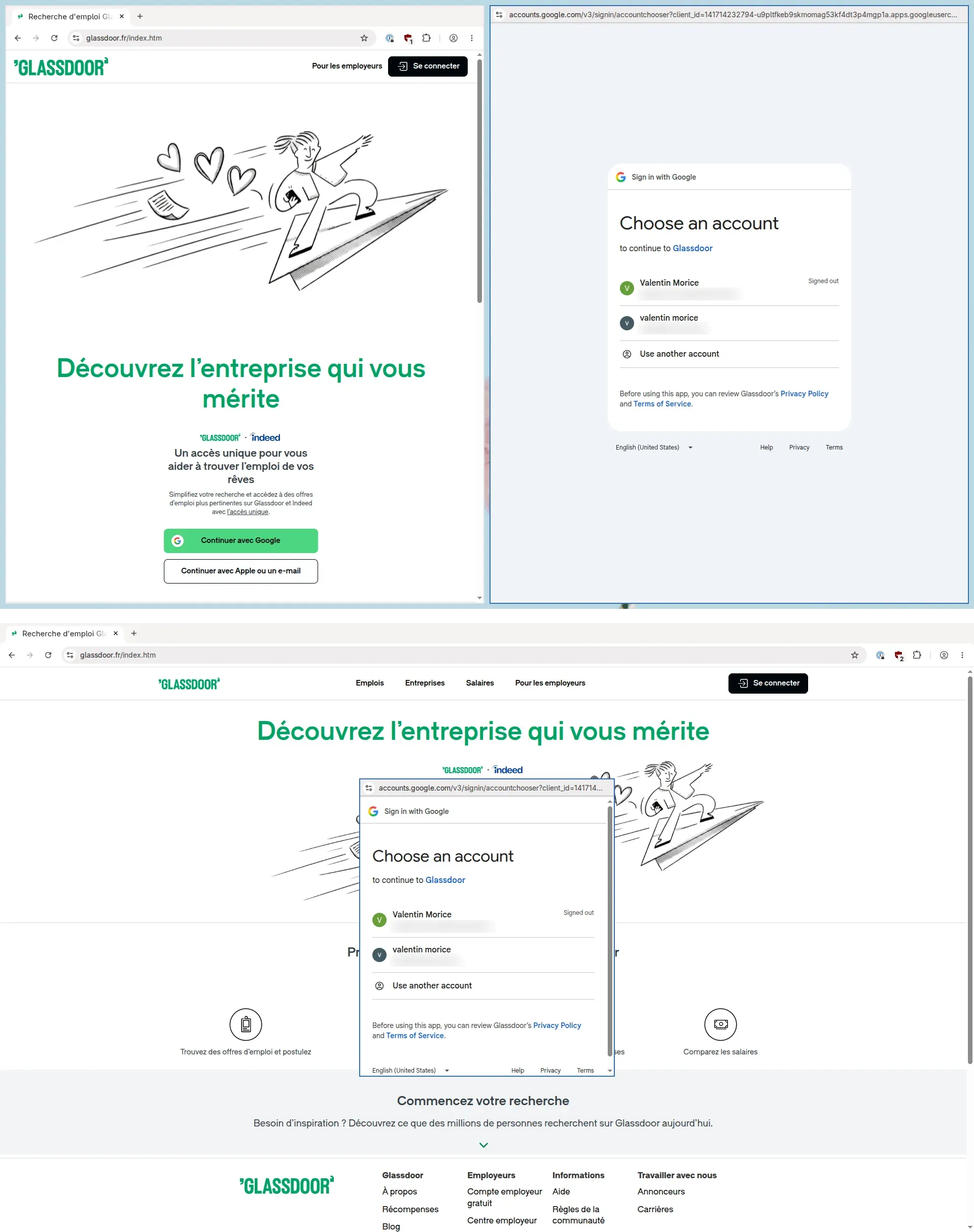
Being JS-brained, my first idea to fix this was a browser extension: chrome.windows.onCreated hands you a windowType of “popup” or “normal”, so the browser knows exactly what it’s opening. With native messaging, I could pipe that out to a helper binary and have it call swaymsg. The catch is that by the time onCreated fires, the window is already tiled and the layout has already reflowed.
It worked, but it also meant every popup snapped into the tiling for a fraction of a second before jumping back out. I lived with it for a few days before admitting there had to be a better way.
Did I mention I’m sometimes JS-brained? Still in recovery, admittedly. I wrote a while back about working through the Rust Book, and this felt like a good excuse to actually use it. What I needed was something sitting between the browser and the compositor, relabeling windows on their way past, so sway (or any other compositor) could tell them apart and float the popups with an ordinary rule. A middleman, if you will.
I was somewhat new to Rust and knew next to nothing about Wayland, so I expected this to be hard. It wasn’t, mostly because a bit of searching turned up wl-proxy by mahkoh, which proxies Wayland connections and lets you intercept and manipulate the messages passing through. With this crate, the only thing left for me to do was to find a way to identify popups and relabel them accordingly.
Let’s go through some vocabulary first.
To Wayland, an application is a client, one process holding one connection to the compositor. Browsers run as a single instance, so launching Chromium while Chromium is already running sends the URL to the process that’s already there.
A window starts out as a wl_surface, which is nothing but a rectangle of pixels. It becomes a window once it’s wrapped in an xdg_surface and given a role:
wl_display // the connection itself └─ wl_registry // what the compositor offers └─ wl_surface // a rectangle of pixels └─ xdg_surface // window semantics └─ xdg_toplevel // an actual windowThe xdg_toplevel is where the labeling happens:
set_app_id -> which application this is: chromium, firefoxset_title -> the human-readable title, which follows the active tabset_parent -> declares this window a child of another windowset_min_size and set_max_size -> size constraintsWindows are then decorated. Decorations are the frame around a window, meaning the title bar, the borders and the close button. They’re either drawn client-side or server-side. Firefox, for example, draws its own, running its tabs right up into the title bar.
While the app_id identifies the application, it doesn’t identify the window. According to the spec, it should match the desktop file, so all the windows of one browser have the same app_id.
This leaves a compositor two strings to write rules against: app_id which is identical across every window, and title which follows the active tab and changes regularly. set_parent would settle it cleanly, but neither browser sends it for popups.
To fix this, wl-relabel opens a Wayland socket of its own, points WAYLAND_DISPLAY at it, and launches the browser, so the browser connects to us rather than to sway. The whole arrangement is three statements:
use std::process::Command;
use wl_proxy::{    baseline::Baseline,    simple::{SimpleCommandExt, SimpleProxy},};
use crate::proxy::DisplayH;
// Our own Wayland socket.let proxy = SimpleProxy::new(Baseline::ALL_OF_THEM)?;
// Launch the browser pointed at us instead of at the compositor.Command::new(&args.command[0])    .args(&args.command[1..])    .with_wayland_display(proxy.display())    .spawn_and_forward_exit_code()?;
// Accept clients until the socket dies, one handler tree each.proxy.run(move || DisplayH::new(shared.clone()));
run never returns on its own. It accepts connections and spawns a thread per client, handing each one its own DisplayH, so every window a browser opens is handled on a single thread. DisplayH is the root of a handler tree that follows the browser down from wl_display to the individual windows.
A popup has no toolbar. No tabs, no URL bar, so it asks the compositor to draw the title bar for it. That’s what Wayland calls server-side decorations.
Both browsers ask for it, but not through the same protocol. Chromium binds zxdg_decoration_manager_v1 and Firefox binds the KDE one, org_kde_kwin_server_decoration, even where sway offers both. wl-relabel normalizes them into a single enum, and rules never have to mention which protocol a window used:
pub(crate) enum Decorations { /// The client never asked. Unspecified, /// The client asked for no frame at all. None, /// The client draws its own frame (a browser main window). ClientSide, /// The compositor is asked to draw the frame (the popup signal). ServerSide,}Server-side decorations aren’t enough on their own. Turn on “use system title bar” and the main browser window asks for them as well, in both browsers, so a rule matching only on decorations would float the whole browser.
We can pair this condition with the minimum size. A main window can’t go below 500 pixels wide because of the URL bar. Popups are much smaller:
| main window | popup | |
|---|---|---|
| chromium | 500 × 87 | 179 × 36 |
| firefox | 500 × 120 | 95 × 95 |
Therefore, the rule takes two conditions: server-side decorations and a minimum width under 400, which sits in the gap between the two columns.
There’s a problem with deciding what a window is. At the moment the browser tells you its app_id, you don’t know anything else about it yet. The decorations request and set_min_size (the two things a rule matches on) both arrive after the app_id you’re meant to be rewriting.
So wl-relabel doesn’t forward the name at all. It stores set_app_id and set_title in memory, and sends its own version once it knows what the window is, which is what Emit carries.
/// What the proxy must send upstream before forwarding the request that produced it.pub(crate) struct Emit { pub app_id: Option<String>, pub title: Option<String>,}So the name has to go out after the decorations and the size have arrived, but before the window is drawn. The obvious answer is the first commit.
Wayland batches changes. A client sets a title, a size, a buffer, and none of it takes effect until it sends wl_surface.commit, at which point the compositor applies the whole batch at once.
Here’s what Firefox actually sends, traced on version 153.0:
set_app_id("firefox") -> commit() <- empty, no buffer -> decoration.create(.., wl_surface) -> request_mode(2) -> attach(buffer) -> set_min_size(95, 95) -> commit() <- mapping commitThe first commit() carries nothing: no buffer, no decorations, no size. Both signals arrive after it. So the thing to wait for isn’t the first commit, it’s the first commit with a buffer attached: the mapping commit, where the window becomes visible.
wl-relabel hooks wl_surface.attach and wl_surface.commit to spot it, classifies against everything gathered by that point, and sends the name on ahead of the batch. The compositor receives the window already correctly labeled, so an ordinary for_window rule fires before anything is drawn.
wl-relabel accepts custom rules. They live in a TOML file at $XDG_CONFIG_HOME/wl-relabel/rules.toml. Having no rules file isn’t an error; everything just passes through unchanged. Parsing happens once at startup, and the result is the shared value from the code block earlier, one ruleset read by every client thread.
Here’s an example rule:
[[rule]]app_id = ["chromium", "firefox"]when.decorations = "server_side"when.min_width_below = 400then.app_id = "{app_id}-popup"Every condition under when has to hold. {app_id} is a placeholder resolved against the window itself, so one rule covers both browsers and produces chromium-popup and firefox-popup respectively. This allows you to write standard sway rules, such as:
for_window [app_id="chromium-popup"] floating enablefor_window [app_id="firefox-popup"] floating enableTo write rules for anything else, run the app behind the proxy with --log:
wl-relabel --log -- chromiumThe proxy then prints a line to stderr for each window as it maps:
mapped app_id="chromium" title="Sign in - Google Accounts" min_size=179x36 max_size=unset decorations="server_side" has_parent=false -> app_id="chromium-popup" title="Sign in - Google Accounts"The values print exactly as you’d write them in a rule, so you can copy them straight across. unset means the app never sent that request, which isn’t the same as sending a zero: a condition reading it fails rather than passing. After the -> is the name the compositor receives, which is the one your for_window rule matches.
Titles work as conditions too, though they’re the weaker signal, since they follow whatever the window is showing:
[[rule]]app_id = [""]when.title_contains = "Task Manager"then.app_id = "chromium-taskmanager"Browsers run as a single instance, so starting one without the proxy while another is already running hands the URL to the running process. You get unlabeled windows and no error message. Copy the desktop file to your home directory and prefix every Exec= line, including the ones under [Desktop Action …]. Use the full path to the binary, since whatever launches a desktop file may not have your cargo bin directory on its PATH.
While wl-relabel is quite reliable (wink), there are things it doesn’t support, most notably Electron. The properties you can observe before a window appears don’t separate Electron windows reliably.
Windows that never send set_app_id are out of reach too. Rules are scoped by app_id, and the empty string counts as a scope (that’s how the task manager rule above works) but a window that sends nothing at all matches nothing.
The 400 pixel threshold is also a measurement rather than a constant. It sits between a 500 pixel main window and a 179 pixel popup today. If popups start tiling again after a browser update, run --log and check whether the numbers moved.
On the upside, wl-relabel never talks to the compositor at all, so none of this is sway-specific. Anything with app_id window rules works, Hyprland and niri included.