The Agent Runtime

You’ve heard it here first. Or maybe not. Either way, 2026 is the year of agentic coding. That’s right, we’re not vibe coding anymore. This is serious business now. So I’d recommend you trade that Hawaiian shirt for a proper Brooks Brothers Oxford button-down and take a moment to reflect on what I’m about to share.
In this article, I’ll reveal trade secrets from the techiest relocation company around, AnchorLess, where I’ve had the pleasure of working for the past year.
After working with Claude Code long enough, I ran into an issue: how do you have two agents working on the same codebase simultaneously? After all, a repository only has one working directory, and you can’t check out two branches at once. The solution is now an industry standard: git worktrees. Each agent gets its own isolated copy of the codebase without overwriting each other’s code.
A git worktree lets you check out multiple branches of the same repository into separate directories at once, each with its own working tree while sharing a single .git history. It’s what makes one-agent-per-branch possible without cloning the repo over and over.
While worktrees aren’t the most ergonomic in TUI-based tools, they’re now the backbone of several GUI agent orchestrators: Codex, Conductor, T3Code and others. Our team landed on Conductor (my boss saw a tweet about it).
Conductor is great for letting each agent run its own isolated version of your project. But what happens when a feature requires a database migration, Redis, S3 file storage, or any other third-party resource? This, my friend, is where the magic happens.
Conductor is built around one core concept: workspaces. Every workspace is an isolated copy of your project; its own branch, its own working tree. Think of it like this: you have a TypeScript monorepo, defined once, and Conductor replicates it into a fresh worktree every time you spin up a new workspace.
But workspaces only isolate your code. External services, such as your database, Redis, and S3 bucket, are shared across every workspace. That means two agents working simultaneously can overwrite each other’s data, corrupt migrations, or delete files the other depends on. If you want isolated resources, you need to separate them at the container level. For that, Conductor gives you three scripts: setup, run, and archive.
Let me give you a concrete example. We use Laravel for our back-end. To run, it requires a .env file with credentials for a database, file storage, and basic config.
When setting up a new workspace, we run an init command, which prompts for the ticket ID. We use that ID as a slug to create a dedicated MySQL database (and a Redis namespace). Each workspace gets its own data, without spinning up a new container instance per workspace.
What if your setup is more complex though? If your Laravel application is Dockerized, you might need additional containers for things like queues, websockets, and so on. Those are started per workspace as part of the same docker-compose stack, spun up by Conductor’s run script.
This leaves us with two docker-compose stacks: an infra stack, which runs globally, and a workspace stack that lives and dies with the workspace.
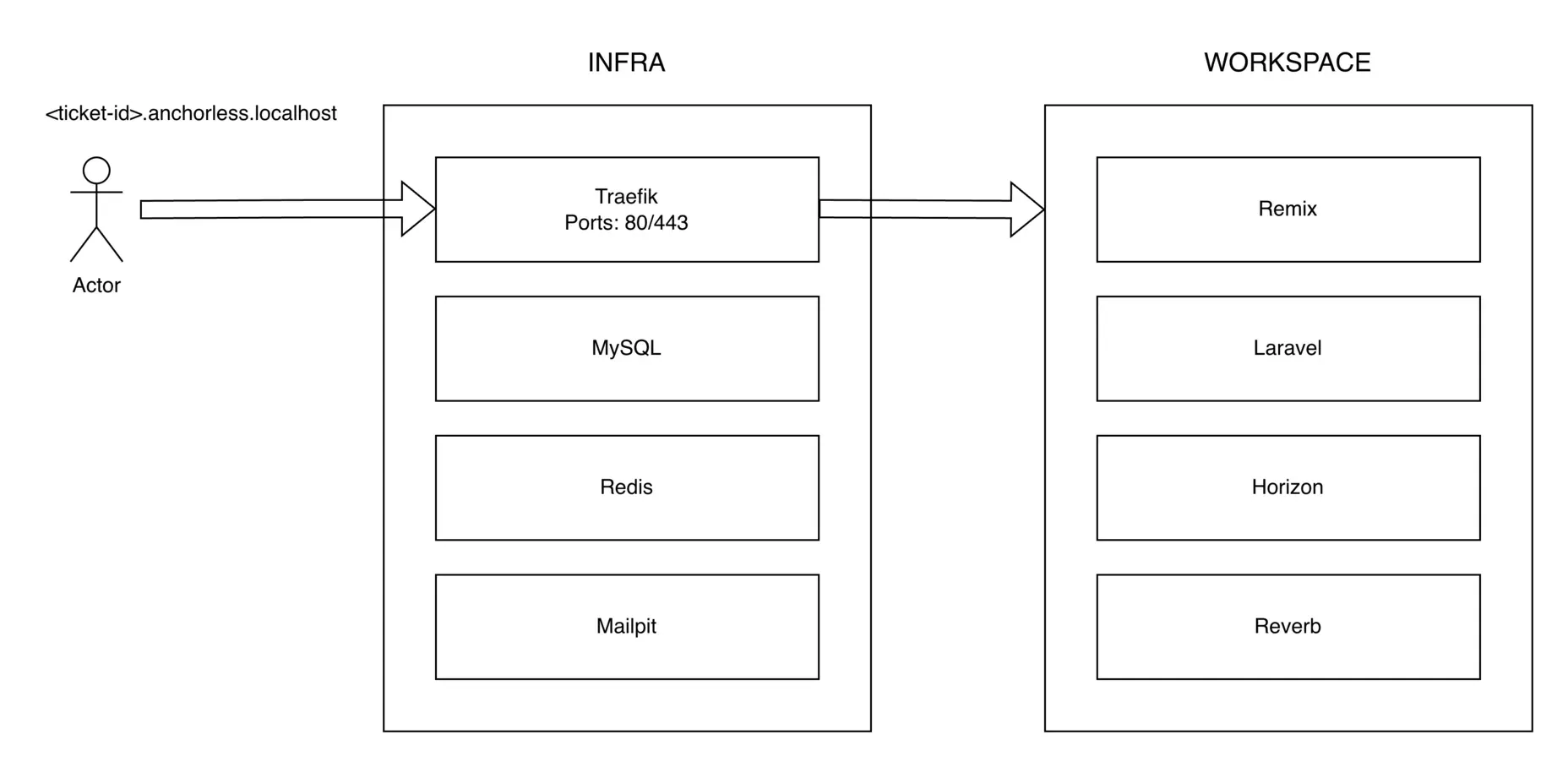
Our front-end runs on Remix, acting as a BFF (Backend for Frontend). Its .env.local is similarly populated by our init command. It shares a Docker network with the Laravel container, so they can reach each other directly using internal container aliases.
This is arguably the most important piece of the puzzle. Traefik runs on our infra stack and distributes traffic to the relevant containers via localhost routing, which means we never have to touch /etc/hosts.
On macOS, *.localhost and *.*.localhost both resolve to 127.0.0.1. This lets us point all traffic at Traefik (listening on ports 80/443), which then routes requests to the right container based on the Host header.
The Remix container we mentioned earlier? Reachable at <ticket-id>.app.anchorless.localhost. Laravel? <ticket-id>.api.anchorless.localhost.
Those URLs feed directly into our env files, which is why we asked for the ticket ID upfront in our init script. Agents can even open a live browser through the chrome-devtools MCP and navigate to their workspace URL directly. And since we run a shared Mailpit container on our infra stack, any emails your application sends during development are captured there, readable by the agent.
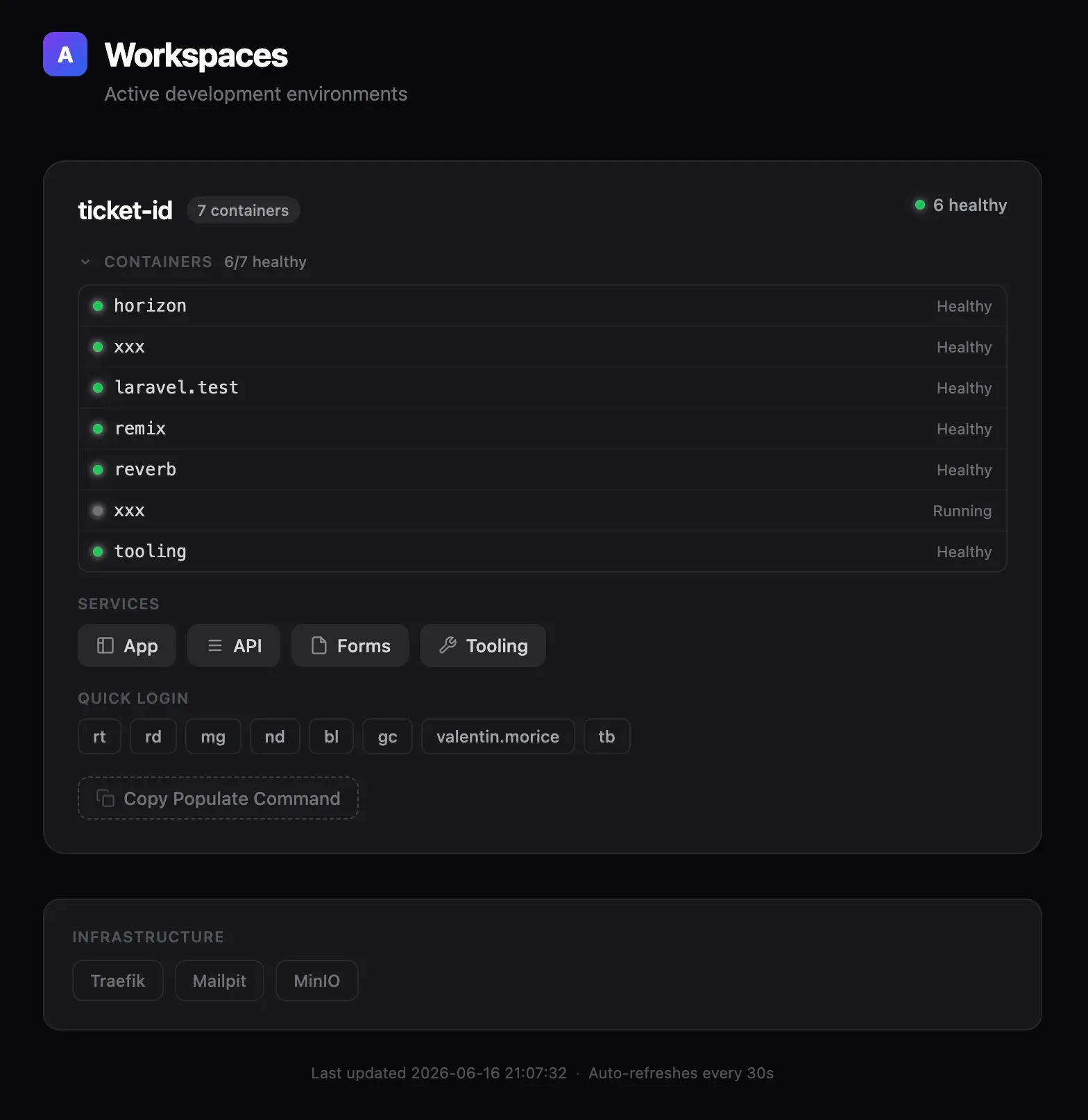
Our Conductor is powerful, but can he handle a full stage? Of course. Once a feature is ready for QA, we follow the same process: each ticket gets its own staging environment, with the ID tying the local workspace and its remote counterpart together.
We installed the Sentry CLI and gcx (Grafana’s remote access tool) locally, so agents can reach our staging environment directly. They can read logs, understand errors, and iterate on their own work without ever being confined to our local machines.
The hardest part of working with agents is visibility. An agent confined to a text editor wastes both time and tokens. What we built is less of a dev environment and more of a habitat: isolated, observable, and connected to the real world.
The natural next step is closing the loop entirely, with agents that monitor staging, catch their own errors, and iterate without being asked. In 2026, the teams that win won’t have the best engineers. They’ll have the best environments.
The AI labs keep redefining RSI, AGI, and intelligence itself to fit the moment. A look at how undefined words became the industry's sharpest marketing tool.
7 min readHow I finally built an Arch + i3 rice that sticks: a one-keypress light/dark theming engine, reproducible Stow dotfiles, and a couple of side quests, all with Claude Code riding shotgun.
8 min read