Who hasn’t grown up scrolling through gorgeous Arch Linux rices on r/unixporn, burning with the desire to one day set up your own window manager on a freshly installed Linux distro? What’s that — just me?
Well, maybe. What’s stopped me from living the dream many a time isn’t a lack of technical knowledge, nor my laid back, nonchalant disposition (okay, maybe a little of that).
But 2026 has brought us technological wonders so great they’d make Nikola Tesla burst from his grave like a spring out of a worn-out mattress.
You guessed it, I’m indeed referring to the meteoric rise of LLMs. In my case, I use Claude Code from the brilliant team at Anthropic.
Writing, storing and distributing dotfiles can be daunting at times. WMs are notoriously barebones, requiring a host of additional packages to include features you’d get out of the box in a standard desktop environment, such as notifications, a taskbar, an application launcher, etc.
But all of this does get significantly easier with the help of a benevolent agent.
This article won’t detail how to set up a functional WM — there are already plenty of articles and YouTube videos to guide you through that. We will, however, discuss why now might be a great time to finally buy that ThinkPad off eBay and dust off the USB-A flash drive that’s been languishing in your glovebox for the last few years.
The Basics
Before starting a new rice, it’s worth remembering what the UNIX philosophy is:
Write programs that do one thing and do it well. Write programs to work together. Write programs to handle text streams, because that is a universal interface.
In practice, a working rice needs a lot of moving pieces, all cooperating to make using your machine a pleasant experience.
The first thing you’ll need to pick is a display server. In the year of our Lord 2026, the two options are Xorg and Wayland. While most would recommend Wayland (justifiably, since Xorg is being deprecated by Red Hat), I chose Xorg for stability and compatibility with older software (looking at you, Upwork). I’m in good company: even i3’s creator, Michael Stapelberg, tries Wayland every year and, as of 2026, still hasn’t made the jump.
The second — and arguably most important — piece of our nerd puzzle is the window manager. As you might have imagined from the previous sentence, I picked i3. It’s the de facto standard: stable, actively maintained, and battle-tested. This not only ensures our system stays functional, but also that Claude will know how to handle its customization better than, say, dwm, where ‘editing the config’ means patching C files and recompiling.
I went with rofi for the launcher, polybar for the taskbar, dunst for notifications, and picom for the compositor. I know, I know, this is all pretty boring. Claude enjoys predictability, remember?

The Fun Part
Now that we’ve hand-picked our software, the fun part begins: configuring every element to your liking.
As I mentioned earlier, I tried several times to build a setup I liked on an Arch VM. Every single time, once I reached a point where I felt somewhat satisfied, I’d stop. This usually took the shape of a functional, good-looking i3 setup with gaps, some basic polybar modules, and maybe a rofi theme stolen from a lonesome GitHub repo. I’d half-ass a color scheme — maybe Catppuccin or Solarized — and stop there. Two weeks later, I’d be back to GNOME.
But not this time. This time, I partitioned my disk, allocated some space to Arch, and installed it on bare metal. Once the install was out of the way (I used archinstall, which got almost everything right apart from GRUB dual-booting shenanigans), I installed Claude Code and went at it.
The thing I was looking for above all was consistency, and that’s precisely where an LLM would help. Instead of stopping at an acceptable level like before, I was free to push further: make my color palette global, give every element consistent border widths and fonts, trigger custom scripts on polybar clicks. In short, control every part of my OS.
One thing that bugged me on previous installs was the “staticness” of my chosen theme. I’d install Catppuccin and everything had to be dark. GTK and Qt applications would feel out of place, because of their accent colors or the tint of their grays (do not get me started on GTK theming!). So I opted instead for the standard Adwaita colors and a Papirus icon theme that blends perfectly with Thunar.
I decided to implement a theme switcher, bound to an i3 keybind, that handles a no-reload light/dark switch with full support for GTK and Qt — even VSCodium and Claude Code itself!
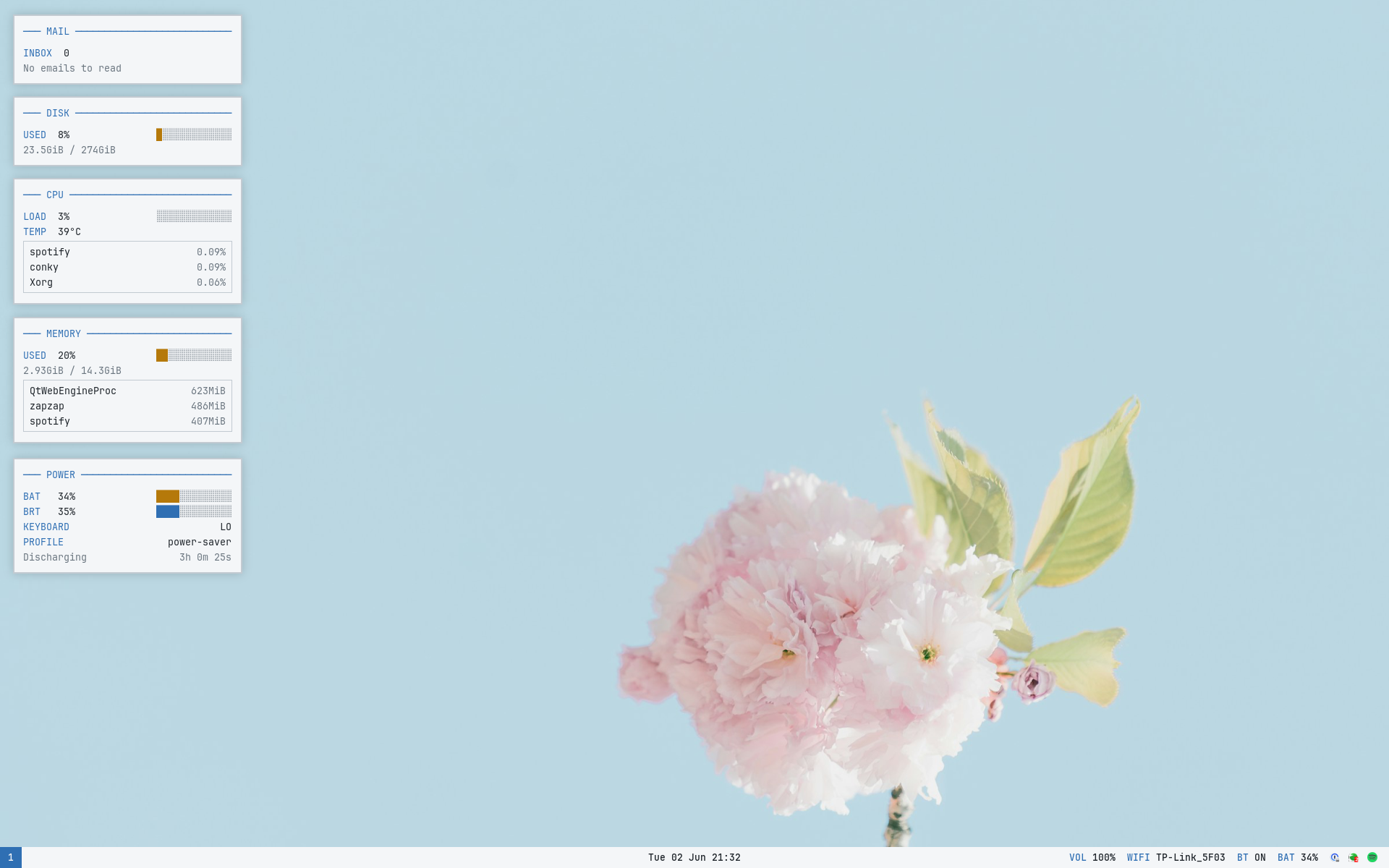
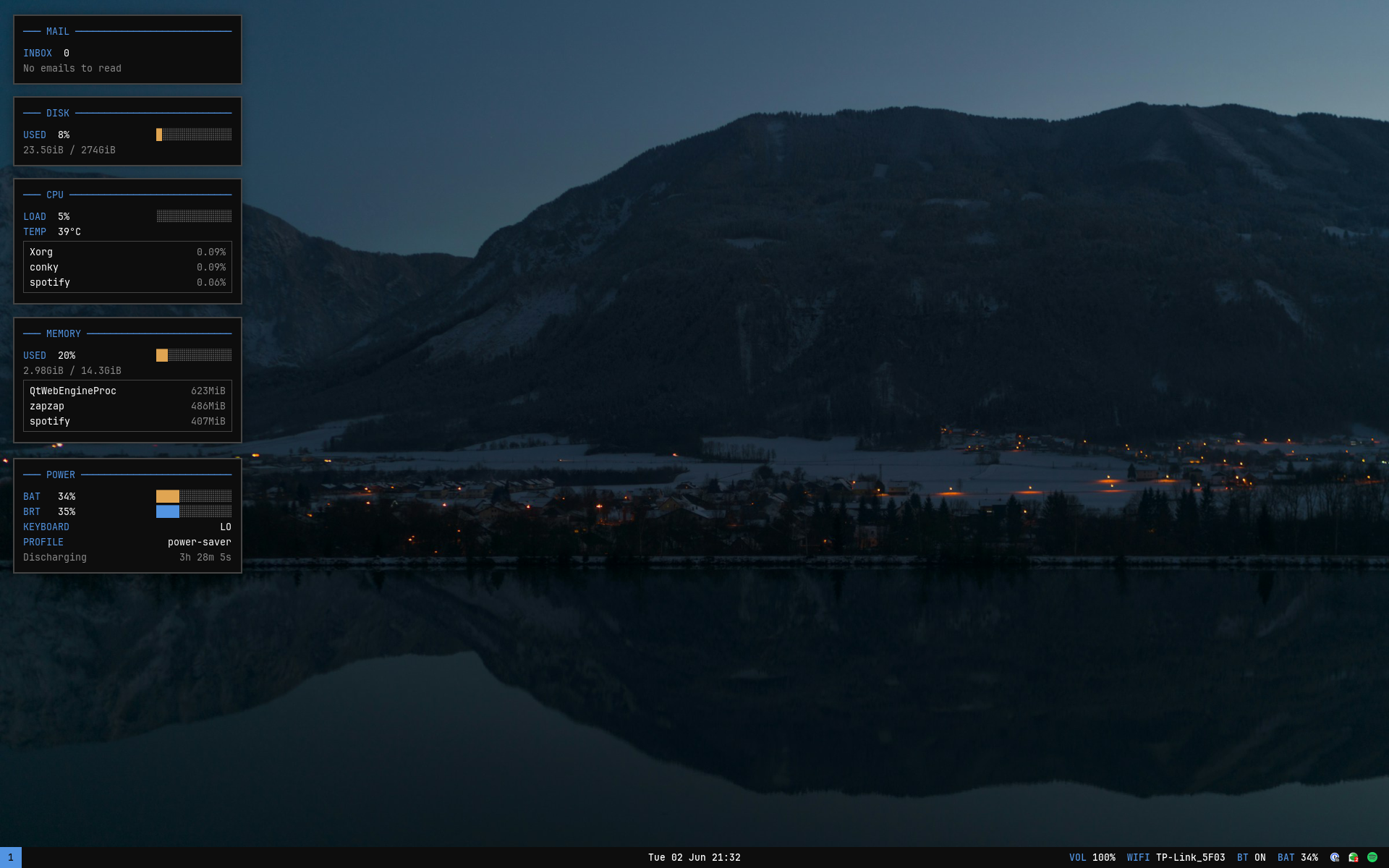
Here’s how we did it:
We isolated our colors to two palette files, dark.sh and light.sh, that export a pile of THEME_* variables: backgrounds, accents, a full sixteen-color ANSI terminal palette, border colors, the GTK and Qt theme names, as well as the wallpaper path.
Every tool then gets a template: its config file with $THEME_bg, $THEME_accent and so on standing in for the actual hex codes. A single script sources whichever palette is active and runs envsubst over every template, spitting out the real configs for polybar, i3, alacritty, rofi, conky, dunst, picom, fastfetch and the GTK files.
The clever bit: the renderer only ever touches the $THEME_* placeholders, so each tool’s own syntax — i3’s $mod, polybar’s and conky’s color variables — passes straight through untouched. A companion script remembers which palette is active and re-renders everything, and Super+Shift+t flips between light and dark. One keypress, and every config is rewritten.
GTK and Qt needed quite a bit more plumbing still, but you’ll find all of it in the dotfiles repo linked to this article. I honestly do not understand all of it myself, so I won’t expand on it here.
Storage and Distribution
My dotfiles were now fine and dandy, but what if an unfortunate AUR update nuked my machine? What if I wanted to share our new creation with the world?
In the world of ricing, GNU Stow is commonly used to reproduce your rice across any number of machines. The principle is simple: it symlinks each file into place, mirroring the layout inside its Stow package.
So we sorted each config into its own Stow package and committed everything to GitHub. That’s as easy as it gets!
Good to know
A Stow package mirrors your home directory. My i3 config lives in the repo at ~/dotfiles/i3/.config/i3/config, and running stow i3 from ~/dotfiles symlinks it to ~/.config/i3/config, exactly where i3 looks for it. Edit the file in either place and you’re editing the same file.
The Side Quest
While this has been genuinely fun, I do have needs beyond tinkering with software. For example, a client set up an email address for me on his IMAP server so I could handle customer support for the SaaS I work on. I kept missing important emails because I’d forget to check that inbox.
Arch’s extensibility, paired with Claude’s cleverness, let me fix it. A small Go daemon — built on emersion’s go-imap library — stays logged into the IMAP server and, the instant a mail arrives or gets read, writes the unread count and latest subject to a file. A conky widget on my desktop reads that file — so unread support mail is always staring back at me. It runs as a systemd user service, so it starts with my session and quietly restarts itself if the connection ever drops.
I also extended rofi to handle wifi, bluetooth, power profiles and window management.
Conclusion
I know AI gets a bad rap in software development, probably linked to the regular job-apocalypse prophecies from Dario, Sam, and other CEOs. But using it like this has done two things at once: taught me a great deal about Linux, and made me excited to learn more.
I, for one, am glad I finally have an Arch setup I can use day-to-day — one that doesn’t feel like a half-finished weekend project.